Page Content
Publishing Content
This module provides step-by-step guidance on how to preview, approve, and publish content and pages. By the end, you’ll know how to finalize both individual content items and entire webpages with confidence.
Learning objectives
- Preview and approve content types to confirm updates display correctly before publishing
- Publish a new subpage by approving content, updating metadata, and changing the page status
- Verify URL structure by reviewing folder names in T4 Site Structure to ensure clean, accurate URLs
- Add metadata descriptions to main pages and subpages to improve SEO and accessibility
Instructions
From the T4 Site Structure, navigate to the page you are updating.
Preview and approve content types
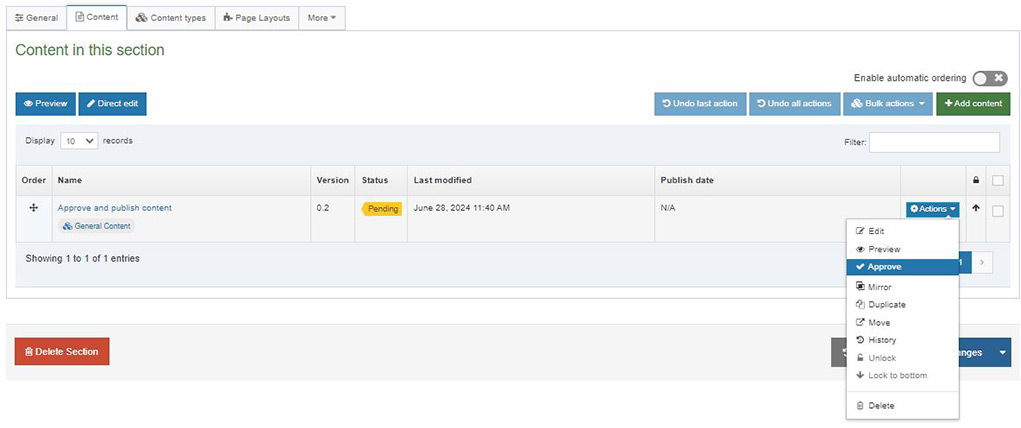
- Navigate to the Content tab of the page you are updating in the T4 Site Structure.
- Click the Actions menu to the right of the content type you'd like to publish.
- Select Preview to review your updates on the page.
- If it appears the way you'd like, navigate back to the content tab.
- Click the Actions menu to the right of the content type you'd like to publish and select Approve.
Note: It takes about an hour for the approved content to publish.
Publish a subpage
This process only needs to be completed when you publish a new subpage for the first time:
- Preview and approve the content on the page following the steps above.
- Add a 140-160 character metadata description for the sub page to improve SEO and accessibility.
- Navigate to the General tab of the page you are publishing.
- Change the Status from "Pending" to "Approved."
- Press Save changes.
Note: It takes approximately an hour for the updates to publish.
Best practices
- Always use the Preview option to confirm that text, images, and formatting appear correctly on the live page
- Ensure headings, styles, and terminology are consistent across pages for a professional, cohesive site.
- Write concise (140–160 character) metadata that accurately summarizes the page and improves search engine visibility
- Verify that every content block (text, images, videos, links) has been approved
- Visit the live URL after the one-hour publishing window to make sure the site looks and functions as expected
Additional resources
By following these steps and best practices, you’ll ensure your web content is accurate, accessible, and ready to engage your audience.